


Extraordinary, Setting Industry Benchmarks
Building a world-class leader in the high-end segmented market of precision engineering measurement
Data Acquisition Software (DAS)
Introduction to Data Acquisition Software (DAS)
Data acquisition software (DAS) is a window for human-machine interaction, used to create detection tasks, control system start and stop, process and store data from various systems, etc. The overall interface style is simple, the layout is reasonable, and the operation is convenient.
The data acquisition software (DAS) includes sub functions such as geographic location information acquisition software, flatness data acquisition, road surface damage image acquisition, rut cross-section acquisition, road surface structure depth acquisition, and road front image acquisition. It can achieve independent or multiple acquisition subsystems to synchronously collect and monitor, and all acquisition indicators can be displayed on the same interface, with system fault alarm prompt function.

Main page
Collection software interface for various systems
Introduction to Data Acquisition Software (DAS)
Data acquisition software (DAS) is a window for human-machine interaction, used to create detection tasks, control system start and stop, process and store data from various systems, etc. The overall interface style is simple, the layout is reasonable, and the operation is convenient.
The data acquisition software (DAS) includes sub functions such as geographic location information acquisition software, flatness data acquisition, road surface damage image acquisition, rut cross-section acquisition, road surface structure depth acquisition, and road front image acquisition. It can achieve independent or multiple acquisition subsystems to synchronously collect and monitor, and all acquisition indicators can be displayed on the same interface, with system fault alarm prompt function.
Software Functions
The collection software can view the working status of various systems in real time, display and save indicator data such as international roughness, construction depth, rut depth, GNSS coordinates, testing speed, and driving distance in real time, display schematic diagrams of sensor working status, and have fault alarm function.

Demonstration Interface
The acquisition software can manually and automatically adjust the exposure and gain parameters of each acquisition system.
It has the function of setting parameters such as detection route highway grade, route number, starting pile number, detection direction, sampling spacing, storage location, and display method. During the detection process, it is possible to calibrate and verify the mileage and station numbers, and to use shortcut keys and custom markings for information such as the starting and ending points of bridge and tunnel structures, abnormal road sections, etc.
Through the 4G/5G communication module, it is possible to remotely view the working status video images and equipment location information of the detection vehicle technician, and display the vehicle position in real-time on the electronic map.

Video monitoring and trajectory viewing during the detection process
The acquisition software can manually and automatically adjust the exposure and gain parameters of each acquisition system.
It has the function of setting parameters such as detection route highway grade, route number, starting pile number, detection direction, sampling spacing, storage location, and display method. During the detection process, it is possible to calibrate and verify the mileage and station numbers, and to use shortcut keys and custom markings for information such as the starting and ending points of bridge and tunnel structures, abnormal road sections, etc.
Through the 4G/5G communication module, it is possible to remotely view the working status video images and equipment location information of the detection vehicle technician, and display the vehicle position in real-time on the electronic map.
Acquisition Software (DAS)
The DAS is installed in the vehicle to control all sensors and store all data. It includes the following functions.
• Process all final data sets on-site immediately after the survey,
• All processed data is in MS Access universal format (. mdb) or Excel format (. xls)
• Built-in calibration wizards,
• Real-time status and graphical display of all connected devices during polling,
• Windows-based,
• Real-time vehicle speed and distance,
• Determination of travel time, counting of moving traffic,
• Function of determining the location of reference points (LRP). This should allow the operator to log LRPs (eg kilometer posts) during filming. All processed data must then be mapped to the total number of nets and LRP nets in the final output tables,
• Event evaluation function (also called key encoding),

The DAS is able to record the following information for each examination:
• Survey/Road ID,
• Region,
• Survey Description,
• Chain Start,
• Chain End,
• Length,
• Operator ID,
• Date and Time,
• Devices Used in Survey,
• Software Version,
It offers a free version of “office mode” that can be installed on an unlimited number of office computers.
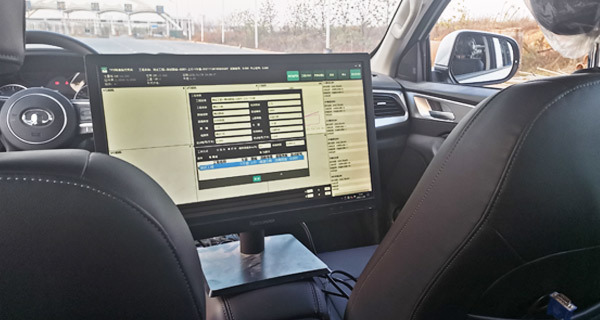
Settings Interface
System characteristics
• The system data is concentrated on a software interface, making it easy to access and display intuitively;
• The main control interface and monitoring interface are integrated into one interface, making it easy to operate;
• The system layout is reasonable and the information display is complete.
Persistently Creating An Extraordinary Brand
Building a world-class leader in the high-end segmented market of precision engineering measurement
Our EquipmentCanada Branch
Phone
Web
www.solik.com
Address
Solik info inc 1240 rue begin Montreal Quebec Canada
About Zoyon
The company always adheres to the business philosophy of "independent innovation and technology serving the country", and continues to create a leading technology experience in the industry. By October 2023, the company has owned more than 100 invention patents at home and abroad, more than 60 software copyrights, and won one second prize of the the State Technological Innovation Award, one second prize of the National Science and Technology Progress Award, and six first prizes of provincial and ministerial science and technology.
Learn MoreISO Qualification
The company has obtained CMMI5 Capability Maturity Model Integration Certification and ISO9001:2015 International Quality Management System Certification, and is qualified for Class B Surveying and Mapping.

Copyright © Wuhan Optics Valley Zoyon Science and Technology Co.,Ltd.


